
When University Marketing & Communications UMC completes a request for your department, you will receive a package containing different files tailored for print and digital use. Please use each file only for its intended platform to ensure the design displays correctly.
Version Types
The Digital Version (-DIGITAL)
Always use this for websites, emails, and social media. These are saved in RGB color format and are technically structured for screen readers and fast loading.

The Print Version (-PRINT)
Use this only for physical printing. These files are saved in the CMYK color format required by professional printers.
Pro-Tip: Identifying Your Files
To avoid confusion, check the filename before uploading or sending:
-DIGITAL: For all web, email, and screen use.
-PRINT: For all physical paper and professional printing projects.
The 40% Rule
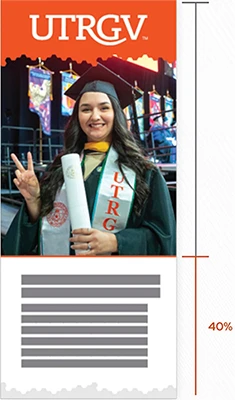
As a rule of thumb, if text covers more than 40% of the layout, the copy should be reduced. By keeping text to 40% or less, we ensure the document is navigable for users who use screen magnifiers and easier to scan for everyone.

Paper Choice & Finish
Custom Print Media
This applies to all physical formats—including brochures, postcards, flyers, signage, and all other printed collaterals. Regardless of the size, the goal is to keep the message short and to the point.
Paper Choice & Finish
The physical material of your project affects its accessibility.
Default to Matte
For documents, reports, and any piece with significant text, use a matte (non-glossy) finish. This prevents light glares that make text "disappear" for readers with low vision or light sensitivity.
When to use Gloss
A glossy finish is acceptable for high impact visual pieces—such as a front cover that is primarily a photo with minimal text. However, any page intended for long-form reading should remain matte to ensure a comfortable and accessible reading experience.
Print Compliance & Support
Departments must ensure all printed collateral meets the typography, color contrast, and layout standards outlined in this guide. Please utilize the self-check tools to verify your materials before production.
For complex layouts or high-priority institutional campaigns requiring a final technical review, you may contact University Marketing and Communications at umcstyleguide@utrgv.edu.