  • About Us
    • Our Team
    • Meet the Provost and Executive Vice President
    • Messages From the Provost
    • Organizational Chart
  • Faculty Resources
  • Contact Us
  • DIRECTORY
  • MAPS
  • MYUTRGV
  • NEWS
  • GIVE
UTRGV home
The University of Texas
Rio Grande Valley
  • DIRECTORY
  • MAPS
  • MYUTRGV
  • News
  • GIVE
Open Search Menu
Menu
UTRGV Trademark Logo
Office of the Provost
  • About Us
    ▼
    About Us Square placeholder image 300px
    • About Us
      • Our Team
      • Meet the Provost and Executive Vice President
      • Messages From the Provost
      • Organizational Chart
  • Faculty Resources
  • Contact Us

Catalog Year Rollover

  1. Home
  2. Digital Solutions
  3. Roadmap Portal
  4. Catalog Year Rollover
Digital Solutions Menu
Menu

Digital Solutions Menu

  • Reports and Dashboards
  • Roadmap Portal
    • Sign In and Access
    • Browsing and Viewing Roadmaps
    • Reference Tables
    • Editing a Roadmap
    • Adding a Course Requirement
    • The Five Requirement Types
    • Creating a New Roadmap
    • Catalog Year Rollover
    • Assigning Reviewers
    • Approving a Roadmap
    • Frequently Asked Questions
  • Roadmap Portal - Training
    • Onboarding: Start Here
    • Track: View Only
    • Track: Editor
    • Track: Manager
    • Track: Reviewer

Contact Us

academicIT@utrgv.edu


Catalog Year Rollover

Copy a whole catalog year forward as drafts, instead of rebuilding hundreds of roadmaps.

Why it exists

The University Catalog is revised every year, so roadmaps are revised and re-approved every year too. Catalog Year Rollover exists so that this does not mean rebuilding hundreds of roadmaps by hand.

Run a rollover

  1. Click Catalog Year Rollover in the left navigation.
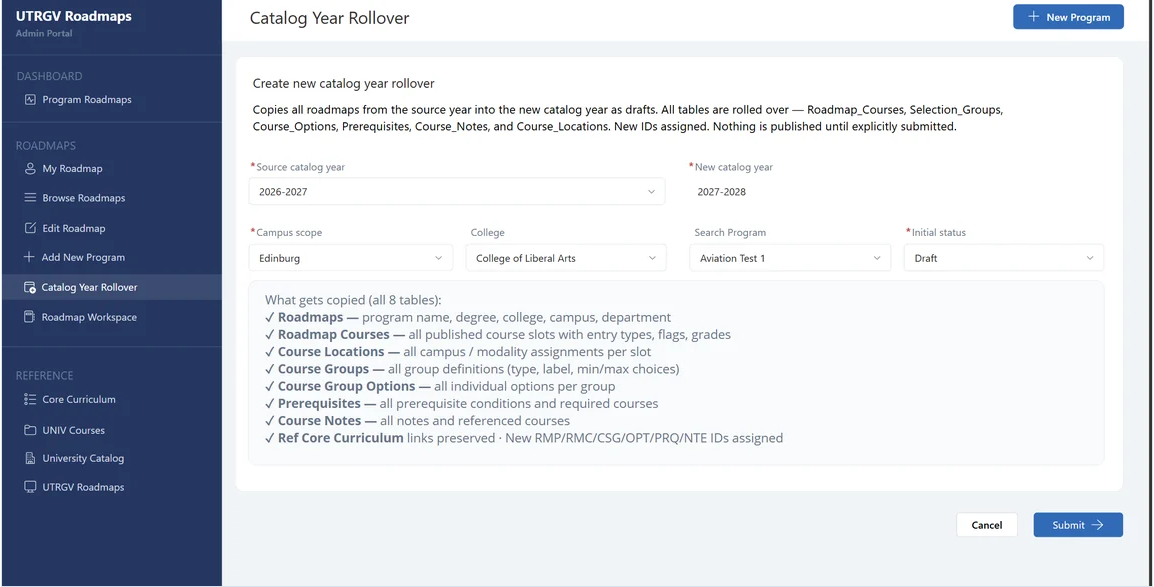
  2. Select the Source catalog year. New catalog year is set automatically to the following year.
  3. Select the Campus scope. Optionally narrow further by College or a single program.
  4. Leave Initial status as Draft.
  5. Click Submit, then confirm.
Catalog Year Rollover screen showing a source catalog year of 2026–2027, a new catalog year of 2027–2028, an Edinburg campus scope, optional college and program filters, and an initial status of Draft.
Catalog Year Rollover.
Catalog rollover confirmation dialog displaying the selected source and new catalog years, campus, college and program, with Confirm and Cancel buttons.
Rollover confirmation prompt.

What gets copied

The rollover copies all eight underlying tables and assigns new record IDs:

  • Roadmaps—program name, degree, college, campus, department
  • Roadmap Courses—all published course slots with entry types, flags and grades
  • Course Locations—all campus and modality assignments per slot
  • Course Groups—all group definitions: type, label, minimum and maximum choices
  • Course Group Options—all individual options per group
  • Prerequisites—all prerequisite conditions and required courses
  • Course Notes—all notes and referenced courses
  • Ref Core Curriculum links, preserved
Nothing is published by the rollover itself. Rolled-over roadmaps appear in All Submissions as drafts. Each one still has to be opened, revised against the new catalog, and submitted for review in the normal way.

Previous

Creating a New Roadmap

Next

Assigning Reviewers

Office of the Provost


Edinburg

Student Services Executive Building 5.101
1201 W. University Dr.
Edinburg, TX 78539
Phone: (956) 665-2111
provost@utrgv.edu

Brownsville

Life & Health Sciences Building 2.402
One West University Blvd.
Brownsville, TX 78520
provost@utrgv.edu

Find UTRGV on Social Media


LIKE. FOLLOW. SUBSCRIBE. ADD.


UTRGV Trademark logo
  • CARES, CRRSAA and ARP Reporting
  • Site Policies
  • Required Links
  • Accreditation Statement
  • Fraud Reporting
  • Senate Bill 18
  • Clery Act Reports
  • Web Accessibility
  • Mental Health Resources
  • Sexual Misconduct Policy
  • Reporting Sexual Misconduct
  • Contact UTRGV
  • 1-844-ATUTRGV
  • Facebook
  • X Twitter
  • Instagram
  • LinkedIn
  • Academics
  • Admissions
  • Cost and Financial Aid
  • Student Life
  • Search Programs
  • First-Year Students
  • Transfer
  • International Students
  • Graduate Students
  • Current Students
  • Faculty Resources
  • Staff Resources
  • UTRGV Careers
  • Visit Campus
  • Directory
The University of Texas Rio Grande Valley