

 rotate(10)'/%3E%3Cpath d='M.038.113v.15l.15.088.15-.088v-.15L.188.025l-.15.088Z' stroke='%23c44900' stroke-width='.0375' transform='rotate(10)'/%3E%3C/svg%3E)
Thesis and Dissertation
Please make sure to read the Thesis & Dissertation Guide in its entirety, as it is crucial and the most current guide available. It’s your most valuable resource throughout this process.
For any assistance or any questions regarding the following, please email ETD@utrgv.edu.
- Creating your Thesis/Dissertation Draft
- Formatting Guidelines for Thesis/Dissertation Draft
- Important Deadlines
- Publication of manuscript
Schedule an appointment to get help with your thesis or dissertation, including formatting assistance, by clicking button below.
Schedule an appointment
For any questions pertaining to Degree Progression, please contact graduatecollege@utrgv.edu
For any questions pertaining to graduation, please contact GradCertification@utrgv.edu
Thesis and Dissertation Deadlines
Fall 2026
Classes Begin
Preliminary Dissertation Drafts Due
Preliminary Thesis Drafts Due
Defense Deadline
Completion Form Deadline
Final Manuscript Deadline
Spring 2027
Classes Begin
Preliminary Dissertation Drafts Due
Preliminary Thesis Drafts Due
Defense Deadline
Completion Form Deadline
Final Manuscript Deadline
Summer I 2027
Classes Begin
Preliminary Dissertation Drafts Due
Preliminary Thesis Drafts Due
Defense Deadline
Completion Form Deadline
Final Manuscript Deadline
Summer II & III 2027
Classes Begin
Preliminary Dissertation Drafts Due
Preliminary Thesis Drafts Due
Defense Deadline
Completion Form Deadline
Final Manuscript Deadline
Fall 2027
Classes Begin
Preliminary Dissertation Drafts Due
Preliminary Thesis Drafts Due
Defense Deadline
Completion Form Deadline
Final Manuscript Deadline
Thesis and Dissertation Frequently Asked Questions
Pre-submission - Questions
Yes, but that person may not be your chair. If you want someone on your committee who is not employed by UTRGV, include that person’s curriculum vitae (CV) as part of the approval process.
Yes. Submit your completed Application for Dissertation/Thesis Committee form before submitting your first thesis or dissertation draft for formatting review. Forms are available through the Smart Forms portal.
Contact your Graduate Program Coordinator (GPC) for recommendations about selecting a new member. If the committee member is not your chair, has not retired, and has not left the education field, that person may still be able to serve on your committee.
If your committee chair has left UTRGV, select a new chair from the UTRGV faculty and submit a Petition to Change Dissertation/Thesis Committee Form. The form must be signed by your GPC, the new members, and the associate dean of the Graduate College. DocuSign is recommended for forms requiring signatures.
Access the Petition to Change Dissertation and Thesis Committee Form.
Contact GradCertification@utrgv.edu or your GPC to verify the status of your credits.
Refer to the posted thesis and dissertation deadlines for the applicable semester.
Reminder: Do not create a new ProQuest account for each submission. Keep a secure record of your login information for future uploads.
You can meet with a Graduate College formatting editor online. Use the appointment scheduler to select an available date and time.
Schedule an appointment with a Graduate College formatting editor.
During the Process - Questions
Yes. All students should submit a draft by the preliminary draft deadline in the semester in which they intend to graduate.
In an inverted-pyramid format, the first line of the title is the longest and each following line is progressively shorter. The title on the committee page and title page must be identical, word for word, double-spaced, and written in uppercase.
Example:
HOW TO WRITE AN AMAZING DISSERTATION OR
THESIS TITLE WITHOUT LOSING YOUR MIND
BY THE END OF THE SEMESTER
Use the inverted-pyramid format for long chapter titles as well.
Center page numbers in the footer, 0.5 inches from the bottom edge. Use lowercase Roman numerals for preliminary pages beginning with the abstract, and Arabic numerals for chapters and supplementary pages. Page numbers should use 12-point Times New Roman.
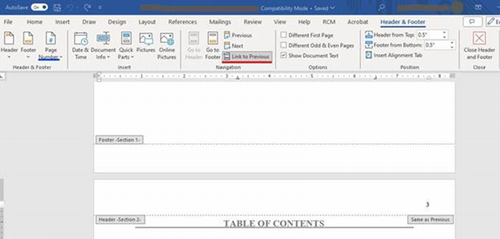
Steps in Microsoft Word
- At the bottom of the page before the numbering system changes, select Layout, Breaks, and then Section Break: Next Page.
- Insert a section break on the blank page after the copyright page.
- On the abstract page, open the footer and turn off Link to Previous.
- Remove pagination from the preceding blank page. This should also remove pagination from all earlier pages.
- Open the footer in the section where numbering should begin and insert a centered page number.
- Select Page Number, then Format Page Numbers. Choose lowercase Roman numerals and set the starting value to iii.
- In the first chapter section, change the format to Arabic numerals and set the starting value to 1.
Use the month and year of your graduation ceremony, not the date you submitted your thesis or dissertation. Center the date at the bottom one-inch margin without commas, using the format Month Year.
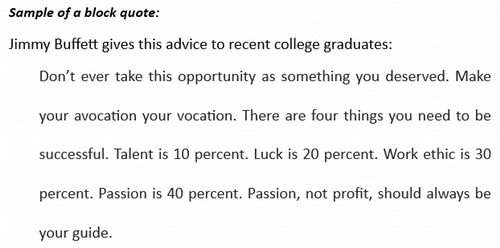
A direct quotation of three lines or longer should be set apart as a block quote. Indent it on both the left and right sides. Justified alignment is recommended. Do not place quotation marks around a block quote.
If your document contains more than one table or figure, include a List of Tables or List of Figures after the Table of Contents.
- List tables and figures in the order in which they appear.
- Include the appropriate page number for each item.
- Use the exact title appearing in the document.
- If a title contains more than one sentence, include only the first sentence in the list.
- If the list extends beyond one page, place the content on subsequent pages at the top one-inch margin.
Place a table title above its table. Place a figure title below its image. If a title is more than one line, single-space it.
Unless your department or college requires a different style, organize references alphabetically and use a hanging indent. Single-space within each entry and double-space between entries.
A vita is the final page of the document. It summarizes educational achievements and degrees, including dates, institutions, and the degree currently being completed. It may also include research experience, publications, awards, presentations, honors, employment, military service, and other relevant accomplishments.
Write the vita in paragraph form, in the past tense and third person. Include the author’s personal email address.
Formatting can involve program-specific expectations. Follow the fundamental requirements in the UTRGV formatting guide and communicate any conflicting instructions to the Graduate College. Email etd@utrgv.edu or contact your formatting editor for assistance.
Drafts are reviewed in the order received. The Graduate College aims to respond within approximately one week. You will receive an email when the review is complete, including any required revisions. If major revisions are required, revise and resubmit through ProQuest within a few weeks.
You may upload a draft for formatting review as many times as needed, but you must upload the preliminary and final drafts by the posted deadlines.
Do not create a new ProQuest account for each upload. Keep a secure record of your login information for future submissions.
Schedule your defense at least two weeks before the final-draft deadline. Submit the defense announcement to the Graduate College at least one week before the defense date.
Writing Center services
- Submit a draft online and receive feedback.
- Schedule online or in-person sessions. Walk-ins are available on Tuesdays and Wednesdays.
- Sessions are 30 minutes. Each student may schedule up to four sessions per week, including online-only Saturday sessions.
Edinburg Writing Center
ESTAC 3.119wc@utrgv.edu
Brownsville Writing Center
BLIBR 3.206Visit the UTRGV Writing Center website.
Doctoral students may contact Doctoral Writing Specialist Joshua Gray by email.
I am Done - Questions
Not necessarily. You may still need to make formatting revisions after the review of your final draft submission.
After you have defended, received formatting clearance from the Graduate College, and the Graduate College has received your Certificate of Completion, your draft will be locked in ProQuest. No further revisions or changes will be allowed.
Verify with your GPC that the Graduate College has received all required graduation paperwork. Doctoral students must also complete the Survey of Earned Doctorates.
Publication takes approximately three months after graduation. This waiting period allows time to confirm that no holds or other issues arise while grades are processed.
Contact ProQuest Customer Service at 1-800-521-0600 or visit ProQuest Support. Have your ProQuest submission ID available before contacting support.
If your research is incomplete or you will not be ready to defend, request a change to your graduation date. Email gradcollege@utrgv.edu to notify the Graduate College.
You may not have completed all degree requirements. Email gradcollege@utrgv.edu or GradCertification@utrgv.edu to verify your status.