

Travel and One Card Frequently Asked Questions
Quick Links
-
Bid Opportunities & Purchasing Transparency
-
UTRGV Bid Terms and Conditions

-
UTRGV Terms and Conditions Change Log

-
Procurement Office Procedures
-
Contract Management Handbook
-
UTRGV Expense Resource Guide
-
UTRGV Hotel Tax Exempt Certificate (Login Required)

-
UTRGV Texas Sales and Use Tax Exemption Certificate (Login Required)
-
Procurement Office SharePoint Site (Login Required)
Restrictions and Advisories
International Travel Restriction - November 19, 2024
Effective November 19, 2024, Governor's Executive Order No. GA-48 imposes travel restrictions on the following regions: China, Cuba, Hong Kong, Iran, North Korea (Democratic People's Republic of Korea), Macau, Russia, and Venezuela.
International Travel Restriction - June 2024
There is a new travel warning issued by the U.S. Consulate Office in Matamoros regarding criminal activity targeting U.S. citizens for kidnapping and extortion. In consultation with the UTRGV Chief of Police, the International Oversight Committee is suspending travel to Reynosa and Matamoros, Tamaulipas, until further notice.
General Questions
SAP Concur iTravel + is a comprehensive system that supports policy compliance for UTRGV Travel, Business Expense Reimbursements and Credit Card reconciliations. It is a one stop shop for Travel reservations, requests, and expenses.
- Travel Bookings/Reservations, Travel Requests and Travel Expenses
- Business Expense Reimbursements
- Credit Card Reconciliations
SAP Concur SAP Concur iTravel+ may be accessed through my.utrgv.edu applications. Access to SAP Concur is only available to UTRGV full-time employees.
- SAP Concur iTravel+ is an integrated system from Booking to Requests and Requests to Expenses
- Travel expenses are not encumbered in SAP Concur iTravel+ Requests
- The U.S. General Services Administration (GSA) meal rates are integrated to SAP Concur iTravel+
- Google Maps integration for mileage calculation
- Supervisors approval for business trips are set up as passive approval in Travel Requests
- New roles for Request and Expense Delegates
All users, from Assistants, Delegates, Supervisors, Special Approvers, Travelers, Card Holders, Cost Center Managers, Alternate Approvers must comply with all policies that apply to expenses processed through iTravel+ including Travel, Credit Card, and Business Expense Reimbursements
Fulltime employees will automatically be loaded into iTravel+. This access will allow fulltime employees to book travel and create/submit travel requests and expenses.
Part-time employees, students, and guests do not have access to iTravel+. If you are needing to book a travel or process and expense transaction for one of these individuals, please see flowchart below to determine how to proceed:
|
Role Name |
General Duties |
|
Traveler/Employee |
Reserve/Book own University approved business travel Create and submit own Travel Requests Create and submit own Expense Reports Assign Delegates for Request/Booking Assign Delegates for processing Expense Reports Assign Travel Arrangers for booking |
|
Approver |
· Review Travel Requests with supporting documentation as supervisor for direct report employees · Review Expense Reports, receipts, supporting documentation for funding source approval and compliance · Return expense report to Employee for correction and resubmission · Add comment(s) to expense report Approve expense report Insert additional Approver in workflow · Approve or Deny Cash Advance requests if identified as the Cash Advance approver
|
Full-time employees have access to process transactions in iTravel+ and may be assigned as delegates to other employees. Work studies are not granted access to iTravel+.
Yes, please follow the steps in the “How to Download and Set Up Concur App” Quick Reference Guide
Yes, users may have more than one Request Delegate and more than one Expense Delegate, and it is highly recommended that at a minimum two Delegates assigned.
Encumbrances are not available in SAP Concur iTravel+
Trainings are available through the UTRGV Training portal at www.utrgv.edu/training
No, forms for Travel Domestic, Travel Foreign, Employee Business Expense Reimbursements and Credit Card Reconciliation forms will be removed from iShop. Users will still have access to view previous expenses processed under those forms. Please review the SAP Concur iTravel+ Transition Guide for processing guidance.
All expected expenses for a business trip should be included as best estimates in the iTravel+ Request including University-Paid and Out-Of-Pocket expenses
You may review all training material that is available to end users at (utrgv.edu/Procurement), for further information contact:
- Non-employee Profile vendorrequest@utrgv.edu
- Travel Booking Travel@utrgv.edu
- Travel Requests Travel@utrgv.edu
- Travel Expenses accountspayable@utrgv.edu
- Business Expense Reimbursements accountspayable@utrgv.edu
- Credit Card Reconciliation Process procard@utrgv.edu
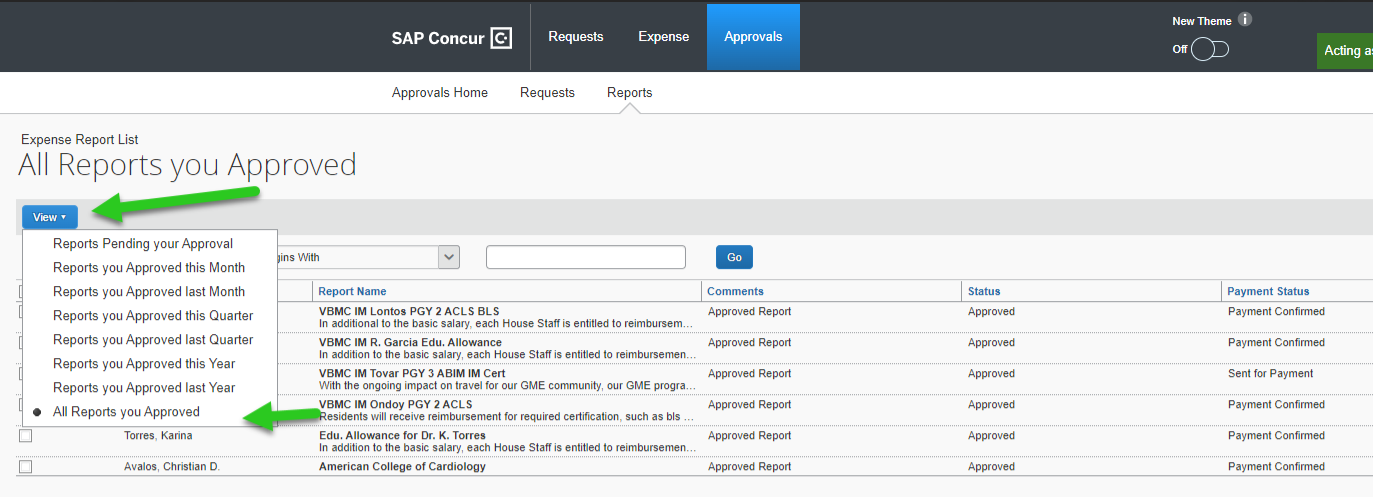
- Click on the "Reports Tab"
- Click on "View" followed by the "All Reports you Approved"
Booking/Requests
Users can choose state rate, Travelers, or Best Available. Please do not choose Government rate.
Domestic and international travel for employees and non-employees, including students, prospective employees, consultants, and guest speakers.
In order to create a profile for a non-employee traveler, complete PaymentWorks process indicating the non-employee is an individual traveling on behalf of the University. Once the process is complete, their information will be processed, through a nightly feed for their profile to be available in for booking and expensing.
- Requests: Supervisor’s passive approval and Dean of Students/International Oversight Committee when applicable
- Expense Reports: Cost Center Manager, or alternate Cost Center Manager when the Cost Center Manager is the traveler, payee, or card holder. IT, Procurement, Assets and Supervisor when applicable.
Yes, all University sponsored, and funded business trips require an approved Travel Request prior to the trip start date. The exception is Inter-campus/Inter-valley mileage, which only require Expense Reports.
Yes, individual travel to foreign destinations may now be reserved/booked in iTravel+
iTravel+ Requests are routed to Supervisors for passive approval. When applicable they are also routed to Dean of Students and International Oversight Committee (note that approval forms must be obtained from Dean of Students Office and International Oversight Committee prior to submitting the requests indicating the approval confirmation#)
International destinations require the approval from supervisors and International Oversight Committee (IOC) on the Travel Request and Cost Center Manger on the Expense. Other approvals such as Dean of Students and Grants Accountants may apply.
When travel takes you to different countries, you will need to convert foreign currency transactions to your reimbursement currency. When creating an expense in a currency other than your own, you will see additional fields that allow you to convert the amount of your transaction to your reimbursement currency. The exchange rate comes from the university approved currency converter.
Only group reservations are allowed outside of iTravel+ and they must be made through the UT Contracted Travel Agency CTP by calling 1-866-366-1142
CTP is the University's full service agency who may assist travelers with any questions. Contact 877- 727-5188 or online@ctptravelservices.com.
Expense
- First method (preferred way) through the Concur mobile App (please see “How to Download and Set Up Concur App” Quick Reference Guide)
- Second way is by scanning and attaching receipts using your workstation (you may use your Konica Minolta copier for scanning or any standard scanner
No, meal receipts are not required for trips with domestic destinations, unless the trip is being funded by a funding source the requires receipts (such as grants).
No, meal receipts are not required for trips with international destinations, unless the trip is being funded by a funding source the requires receipts (such as grants).
Yes, itemized receipts are required for all expenses except for travel meals. If the funding source requires itemized receipts, it is the responsibility of the traveler and delegate to secure the receipts and uploaded into SAP Concur iTravel+ for the specific transactions.
Effective 1/1/2025, there is no longer a separate inter-campus/inter-valley mileage rate.
- Inter-campus/inter-valley travel taking place prior to 1/1/2025 will be reimbursed at $.23 per mile
- Inter-campus/inter-valley travel taking place on or after 1/1/2025 will be reimbursed at $.70 per mile
Uploaded receipts must be legible and uploaded the SAP Concur iTravel+ specific transactions in order to be eligible for reimbursement and to be in compliance with University Travel policies
Expenses in iTravel+ may be University Paid (when an expense is paid with a OneCard (Citibank)) and Out-Of-Pocket (payable to the traveler based on the profile selection).
Non-employees, must submit receipts through email to their Request / Expense delegates as applicable.
Instructions on how to submit a travel expense report can be found in the following guide: How to - Submit a Travel Expense Report.
OneCard
Credit card program participants will be issued a One Card: a combination of a travel card and a procurement card.
One Card reconciliation must be submitted and fully approved by the 20th of each month in order to remain compliant with the program guidelines.
Instructions can be found on the How to ‐ Activate U.S. Bank One Card Guide Quick Reference Guide
U.S. Bank One Card can be used starting 1/5/2026.
Note that the U.S. Bank Transfer Application, FY25 One Card Training, and Citibank Bank Reconciliations must be completed before cards are released.
Cardholder's can change their PIN by visiting U.S. Bank at https://www.access.usbank.com/cpsApp1/React/authentication/change-pin/enter-card-information
coming soon
Please submit a new entry in the One Card Increase Request form in the Procurement Office SharePoint.
Please contact the number on the back of your card to inquire the reason of the decline.
Once you inquire on the purpose of the decline and need further assistance, please send an email to procard@utrgv.edu. If a temporary increase is required refer to the question above for further information on your request.
If the decline is due to an MCC Code, please contact the number on the back of your card and they will give you the MCC Code and description of the Code. With this information, please verify within the ProCard guidelines that your purchase is allowable. Once you have confirmed this information you may email procard@utrgv.edu with details.
The card will take approximately 10 Business days after all trainings and required documentations are received and reviewed by Procard Office.
We are currently not accepting applications as we are tranistioning from Citibank to U.S. Bank. Please check back for updates.
To change or update your credit card reconciler, please complete the Transfer of Responsibility for Credit Card - Reconciler Form and email the completed copy to procard@utrgv.edu
To change or update your credit card cost center manager, please complete the Transfer of Responsibility for Credit Card - Cost Center Manager Form and email the completed copy to procard@utrgv.edu
Once you confirm that it was a fraudulent transaction, contact the bank by calling the number on the back of your card. Tell the agent you wish to dispute a charge. Once they verify some information from the card holder, they will assist in issuing a new card.
While the system allows special characters in the name of your expense report, some characters may not be accepted, such as pipe (|) or quotations (").
It is recommended not to include any special characters in any free text fields.
No, memberships should not be charged to a university credit card and should be processed on the Non PO Payment Request Form in iShop.