

 rotate(10)'/%3E%3Cpath d='M.038.113v.15l.15.088.15-.088v-.15L.188.025l-.15.088Z' stroke='%23c44900' stroke-width='.0375' transform='rotate(10)'/%3E%3C/svg%3E)
Submit, Review and Download Your Design
University materials created in Canva must follow the UTRGV review process before they are printed, published, posted, or distributed.
Before Submitting Your Design
Confirm that your design is located in the UTRGV Official Brand team and complete the following checks:
- Verify names, titles, dates, times, locations, links, and contact information.
- Proofread all spelling, grammar, and punctuation.
- Confirm that required departmental or subject-matter approvals have been obtained.
- Use only images, graphics, and other content that you have permission to use.
- Confirm that official logos have not been altered, stretched, recolored, or rearranged.
- Use approved UTRGV colors and typography.
- Run Canva’s built-in accessibility checker.
- Review the final design at its intended size.
Submit Your Design for UMC Review
When your design is ready:
- Open the design in the UTRGV Official Brand team.
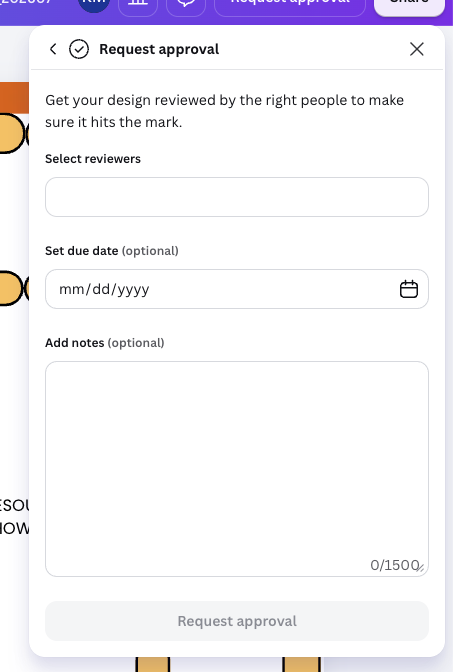
- Select Request review.
- Follow the prompts to submit the design to UMC Brand Review.
- Enter the requested information, including the date by which the reviewed design is needed.
- Submit the request and monitor the design for comments or requested changes.
Please allow 24–48 hours for UMC review. More time may be required for complex materials, extensive revisions, or high-volume periods. Submit materials as early as possible to allow time for review and corrections.
What UMC Reviews
UMC’s Canva review focuses on:
- Alignment with UTRGV brand standards.
- Appropriate logo use and placement.
- Use of approved colors, fonts, and visual assets.
- Overall visual presentation.
- Applicable accessibility considerations.
- Potential brand or reputational concerns.
The requesting department is responsible for:
- The accuracy and completeness of the content.
- Names, titles, dates, times, locations, contact information, links, and QR codes.
- Confirming that all links and QR codes work and direct users to the intended destination.
- Spelling, grammar, and punctuation.
- Program, event, academic, medical, legal, or policy information.
- Obtaining necessary departmental or subject-matter approvals.
- Confirming that the content is ready for publication.
UMC review does not replace departmental proofreading, factual verification, or other required university approvals.
If Revisions Are Requested
The review process is intended to help users create materials that meet UTRGV brand standards. When revisions are needed, UMC’s feedback will identify what should change and help users apply that guidance to future projects.
If you receive feedback:
- Review all comments before making changes.
- Complete the requested revisions.
- Respond to questions or comments when clarification is needed.
- Resolve completed comment threads when appropriate.
- Resubmit the design if instructed.
Download Your Approved Design
Once the review process has been completed:
- Open the reviewed design.
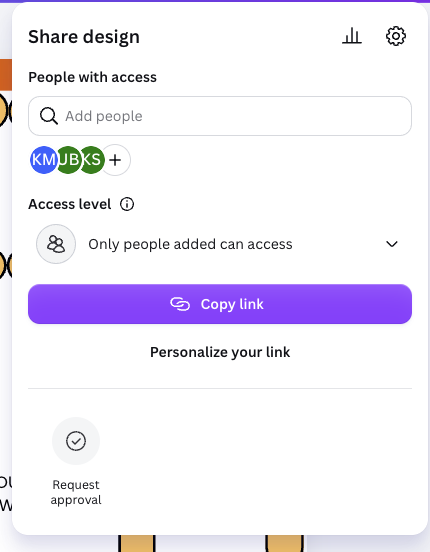
- Select Share.
- Select Download.
- Choose the appropriate file type.
- Select the approved pages.
- Select Download.
- Open and inspect the downloaded file before distributing or publishing it.
Choose the Appropriate File Type
PDF Print
Use PDF Print for materials being sent to a professional or commercial printer for high-quality printing.
PDF Digital
Use PDF Digital for materials intended to be viewed or shared electronically, such as through email, websites, or other digital platforms.
PNG
Use PNG for most digital graphics, including graphics intended for websites, presentations, or social media.
JPG
Use JPG for photographs or digital images when a smaller file size is needed.
If you are uncertain which format to use, contact UMC before downloading or distributing the material.
Final Check
Before publishing, printing, or distributing the downloaded file:
- Confirm that the correct version was downloaded.
- Check that all approved pages are included.
- Review the file for unexpected formatting changes.
- Test all links when applicable.
- Confirm that no changes were made after UMC completed its review.
If the design changes after review, it may need to be submitted again.