
 rotate(10)'/%3E%3Cpath d='M.038.113v.15l.15.088.15-.088v-.15L.188.025l-.15.088Z' stroke='%23c44900' stroke-width='.0375' transform='rotate(10)'/%3E%3C/svg%3E)
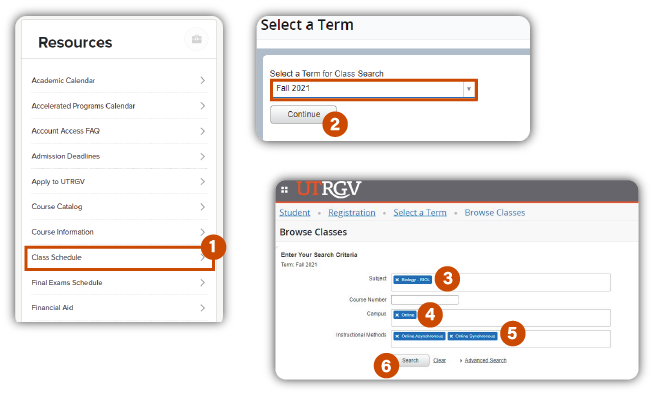
- From the My UTRGV portal, click on Class Schedule, under Resources. Ensure you are not logged into the portal to view the Resources section.
- Select a Term from the dropdown menu and click Continue.
- Select a Subject.
- On the Campus, select Online.
- On the Instructional Methods list, select Online Synchronous, Online Asynchronous, Hybrid, etc.
- Click on the Search button.